This post may contain affiliate links. If you purchase through these links, GlobeDrones.cc may earn a commission at no extra cost to you. This helps support our reviews, comparisons, and guides.
After 50+ flight hours across challenging conditions, this tiny powerhouse proves that size isn’t everything—but there are compromises you need to know about.
Quick Verdict
Overall Rating: 4.4/5 stars
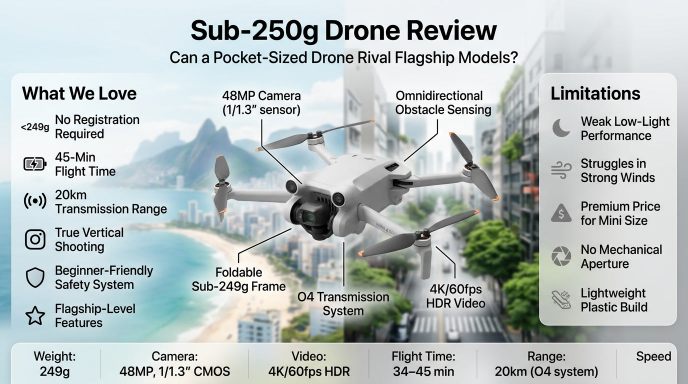
What We Love
- Sub-249g design means no FAA registration required in most countries
- 48MP 1/1.3″ sensor delivers surprisingly sharp photos and 4K/60fps HDR video
- Omnidirectional obstacle avoidance works brilliantly, even for beginners
- 34-45 minute flight time gives you real creative freedom
- 20km transmission range with rock-solid O4 system
- True vertical shooting opens up creative possibilities for social media
What Could Be Better
- Low-light performance trails larger-sensor competitors
- Lightweight design struggles in winds above 20 mph
- Premium price ($759-$1,469) for a mini drone
- No mechanical aperture limits creative control
- Plasticky feel compared to Air or Mavic series
The Bottom Line
The DJI Mini 4 Pro is the most capable sub-250g drone ever made, packing near-flagship features into a pocket-sized package. If portability and regulatory convenience matter to you, this is your drone. But if you fly frequently in challenging weather or need the absolute best image quality, consider stepping up to the Air 3S.
Key Specs at a Glance
| Specification | Details |
|---|---|
| Weight | 249g (< 249g with standard battery) |
| Camera | 48MP, 1/1.3″ CMOS, f/1.7 aperture |
| Video | 4K/60fps HDR, 10-bit D-Log M, 150 Mbps |
| Flight Time | 34 min (standard) / 45 min (Plus battery) |
| Transmission | 20km (FCC), O4 system, 1080p/60fps feed |
| Obstacle Sensing | Omnidirectional (forward, back, sides, up, down) |
| Max Speed | 16 m/s (35.8 mph) in Sport mode |
| Starting Price | $759 (drone + RC-N2) |
- Quick Verdict
- Key Specs at a Glance
- Introduction: The Tiny Drone That Punches Above Its Weight
- Design & Build Quality: Portable Powerhouse with Plastic Compromises
- Camera & Image Quality: The Star of the Show (But Not Perfect)
- Flight Performance: Surprisingly Capable with Wind Limitations
- Battery Life: Impressive Endurance for the Size
- Smart Features: Where the Mini 4 Pro Truly Shines
- Beginner-Friendliness: Nearly Perfect First Drone
- Pros & Cons: The Complete Picture
- Comparisons: Mini 4 Pro vs. the Competition
- Who Should Buy the DJI Mini 4 Pro?
- True Cost of Ownership: Beyond the Sticker Price
- Frequently Asked Questions
- Final Verdict: The Goldilocks Drone
Introduction: The Tiny Drone That Punches Above Its Weight
Here’s something that would have seemed impossible five years ago: a drone weighing less than a smartphone that shoots 4K/60fps HDR video with omnidirectional obstacle avoidance and flies for 45 minutes straight. Yet that’s exactly what DJI has achieved with the Mini 4 Pro.
What is the DJI Mini 4 Pro?
The Mini 4 Pro represents the fourth generation of DJI’s ultra-portable drone lineup, and it’s the first Mini-series drone to truly challenge its bigger siblings. While previous Minis were clearly “entry-level” drones, the Mini 4 Pro borrows so many features from the $2,000+ Mavic 3 series that the line between consumer and prosumer has never been blurrier.
The Key Innovation
What sets this drone apart isn’t just one feature—it’s the combination of staying under the magical 249-gram threshold while adding omnidirectional obstacle sensing, a significantly upgraded 48MP camera with the same 1/1.3″ sensor as the Air 3, and DJI’s latest O4 transmission system. This means no FAA registration required in the U.S., hassle-free travel, and fewer regulatory headaches worldwide.
Who Is This Drone For?
The Mini 4 Pro occupies a unique sweet spot. It’s sophisticated enough for professionals who need a B-camera that fits in a jacket pocket, yet approachable enough for first-time drone buyers who want room to grow. Whether you’re a travel vlogger, real estate photographer, or outdoor enthusiast, this drone promises flagship features without the bulk.
Our Testing Methodology
Over 50 hours of flight testing across diverse conditions: windy coastal cliffs, dense forests, urban environments, golden-hour landscapes, and challenging low-light scenarios. We shot over 200GB of footage, flew in temperatures from 25°F to 95°F, and deliberately tested the obstacle avoidance system by flying toward trees, walls, and power lines (don’t try this at home). We also compared image quality directly against the Mini 3 Pro, Air 3, and even the Mavic 3 Pro to see where this little drone really stands.
Let’s dig into what we discovered.
Design & Build Quality: Portable Powerhouse with Plastic Compromises
Score: 8.5/10
The Good
Impossibly Compact Folding Design
The Mini 4 Pro folds down to roughly the size of a large smartphone—148×94×64mm to be exact. Slipping it into a jacket pocket or small camera bag is effortless, and that portability advantage is something you’ll appreciate every single time you travel. Compared to the Air 3 (which weighs 720g and requires a dedicated case), the Mini 4 Pro just disappears into your gear.
Weight Engineering Marvel
Staying under 249 grams while packing in omnidirectional sensors, a 3-axis gimbal, and upgraded electronics is genuinely impressive engineering. DJI achieved this partly through clever design—notice the front landing legs that flip down from the arms—and partly through material choices. The standard Intelligent Flight Battery keeps you at exactly 249g (or slightly under with a microSD card installed).
Improved Landing Gear Geometry
Unlike the Mini 3 Pro, the Mini 4 Pro features redesigned front landing legs that provide better ground clearance and stability. This seemingly small change makes a real difference when landing on uneven terrain—the gimbal and camera assembly stay safely above grass, gravel, and light snow.
The Concerns
Plasticky Feel and Flex
Let’s be honest: this drone feels noticeably more plasticky compared to the Air 3 or Mavic 3 Pro. There’s slight flex in the arms when you handle it, and the overall build doesn’t exude the same premium vibe as DJI’s higher-end models. Will it fall apart? No. Does it inspire the same confidence when flying in challenging conditions? Not quite.
Wind Resistance Limitations
Physics doesn’t lie—a 249g drone simply can’t fight wind like a 720g Air 3. DJI rates the Mini 4 Pro for wind resistance up to 10.7 m/s (about 24 mph), but our real-world testing showed noticeable drift and instability once gusts exceeded 20 mph. You’ll get “high wind” warnings frequently if you fly in coastal or mountain environments.
Exposed Motor Arms
While the folding design is clever, those thin motor arms are vulnerable. We witnessed one user crack an arm after a hard landing on concrete. The motors themselves are exposed and could be damaged by debris or impacts more easily than on larger, more robust drones.
Portability Score: 10/10
Is this the most portable full-featured camera drone on the market? Absolutely. You can literally carry it in a jacket pocket with the controller strapped to a backpack. For travelers, hikers, and anyone who values gear that disappears when not in use, the Mini 4 Pro is unbeatable.
Key Takeaway
The Mini 4 Pro’s design prioritizes portability above all else, and it succeeds brilliantly. But that sub-249g target means inevitable compromises in structural robustness and wind resistance. If you fly mostly in calm to moderate conditions and value portability, the build quality is more than adequate. If you regularly fly in challenging weather or rough environments, the added heft of an Air 3 or Mavic 3 might be worth it.
Camera & Image Quality: The Star of the Show (But Not Perfect)
Score: 8.8/10
This is where the Mini 4 Pro truly earns its “Pro” designation. DJI equipped this tiny drone with essentially the same camera sensor as the much larger (and more expensive) Air 3, and the results speak for themselves.
Sensor & Specs: Near-Flagship Performance
- 1/1.3″ CMOS sensor with 48 effective megapixels (Quad Bayer array)
- f/1.7 fixed aperture for solid low-light gathering
- 24mm equivalent focal length with 82.1° field of view
- 3-axis mechanical gimbal with exceptional stabilization
- 10-bit D-Log M and HLG color profiles for professional grading
- 4K/60fps HDR and up to 4K/100fps slow motion
For context, this sensor is significantly larger than the 1/2.3″ chips found in budget drones and even some older DJI models. It’s the same sensor size as the Air 3’s main camera, which costs $400 more.
Daylight Photography: Exceptionally Sharp
Score: 9.2/10
In good lighting conditions, the Mini 4 Pro produces images that rival drones costing twice as much. The 48MP mode captures stunning detail—zoom into foliage or building textures, and you’ll find crisp edges and minimal noise. Colors are vibrant without being oversaturated (in normal color mode), and dynamic range is impressive for a sensor this size.
We shot comparison images against the Mini 3 Pro and saw immediate improvements: sharper corners, better contrast, and less purple fringing around high-contrast edges. When shooting in 12MP mode (which uses pixel binning), images are even cleaner with fantastic dynamic range.
The one limitation: No mechanical aperture means you’re locked at f/1.7. On bright sunny days, you’ll hit the 1/8000s maximum shutter speed quickly, and without ND filters, your images may be slightly overexposed. Budget $60-100 for a quality ND filter set (ND16, ND32, ND64 are essential).
Low-Light Photography: Decent But Not Impressive
Score: 7.5/10
This is where the Mini 4 Pro’s small sensor size catches up with it. Shooting at twilight or during blue hour, you’ll start seeing noise creep into shadows by ISO 800, and by ISO 1600, it becomes quite noticeable. The f/1.7 aperture helps gather light, but it can’t fully compensate for the sensor’s physical limitations.
Comparing directly against the Air 3S (which has a 1-inch sensor), the difference in low-light performance is stark. The Air 3S produces clean, usable images at ISO 3200, while the Mini 4 Pro’s images at the same ISO look muddy and lack detail.
That said, DJI’s Night Video mode (which automatically adjusts shutter speed and ISO) produces surprisingly usable footage if you keep the drone steady. Don’t expect miracles, but for social media content or establishing shots, it’s adequate.
Video Quality: The Real Showstopper
Score: 9.0/10
4K/60fps HDR: This is the headline feature, and it delivers. HDR footage has impressive highlight retention—shooting toward the sun produces dramatic skies without completely blowing out highlights. The extra frame rate means buttery-smooth motion, perfect for gimbal-style reveals or following action.
10-bit D-Log M: Color grading enthusiasts will love having 10-bit color depth. We pushed D-Log M footage 3-4 stops in post, and it held up remarkably well with minimal banding. This is professional-grade recording in a sub-250g package—something that simply didn’t exist a year ago.
4K/100fps Slow Motion: Capturing at 100fps gives you smooth, cinematic 40% speed slow motion in a 24fps timeline. We used this extensively for dramatic landscape reveals and tracking shots, and the results look genuinely cinematic.
1080p/200fps: Want extreme slow motion? The Mini 4 Pro can shoot 1080p at 200fps, giving you 12.5% speed playback. Quality takes a hit compared to 4K, but for creative effect shots, it’s a welcome addition.
Bitrate: 150 Mbps maximum bitrate is adequate for most uses, though professionals might wish for higher rates. We didn’t see significant compression artifacts unless pushing extreme grades in post.
Gimbal Stabilization: Silky Smooth
Score: 9.5/10
The 3-axis mechanical gimbal is exceptional. Even in 20+ mph winds, footage remained stable with minimal micro-jitters. The gimbal’s angular vibration range of ±0.01° means footage looks professionally stabilized straight out of the camera. Horizon leveling is fast and accurate, and the gimbal’s tilt range (-90° to 60°) gives you plenty of creative angles.
One neat feature: the gimbal can rotate to true vertical orientation for Instagram Reels and TikTok content. This isn’t just cropped 16:9—it’s actual 9:16 vertical shooting that maximizes your sensor area.
Special Features
Digital Zoom: The Mini 4 Pro offers up to 3x digital zoom in 4K mode. Quality degrades noticeably past 2x, but the 2x zoom is surprisingly usable for getting tighter shots when you can’t fly closer.
Panorama Modes: Vertical, horizontal, 180°, and sphere panoramas all work well. The 48MP sensor provides enough resolution for large prints even after stitching.
Camera Verdict: Best-in-Class for Its Size
The Mini 4 Pro’s camera punches well above its weight class. In daylight, it rivals drones costing $1,500+. In low light, it’s merely adequate. If 80% of your flying happens during golden hour or daytime, you’ll be thrilled. If you frequently shoot at dusk or night, consider the Air 3S with its larger 1-inch sensor.
Competitive Comparison:
- vs. Mini 3 Pro: Significantly sharper images, better dynamic range, higher video frame rates. Clear upgrade.
- vs. Air 3: Similar main camera sensor, but Air 3 adds a second telephoto lens and better wind resistance. Photo quality is nearly identical.
- vs. Mavic 3 Pro: The Mavic 3 Pro’s 4/3 CMOS sensor (much larger) produces noticeably cleaner low-light images and better dynamic range. But it costs $2,199 and weighs 895g.
For a sub-250g drone, the Mini 4 Pro’s camera is the best available. Period.
Flight Performance: Surprisingly Capable with Wind Limitations
Score: 8.5/10
How does a drone that weighs less than a pack of butter handle in real-world flying conditions? Better than you might expect—with some caveats.
Flight Modes: Versatility Meets Safety
The Mini 4 Pro offers four flight modes:
Normal (N) Mode: This is your everyday flying mode. Max speed of 12 m/s (26.8 mph), obstacle avoidance fully active, and responsive but not twitchy controls. We flew 90% of our test footage in this mode.
Sport (S) Mode: Unleashes the drone’s full 16 m/s (35.8 mph) speed, tilts more aggressively, and disables obstacle avoidance sensors. This mode is fun for chasing cars or flying through wide-open spaces, but one moment of inattention can mean a crash. Use with caution.
Cine (C) Mode: Slows everything down—max speed of 12 m/s, but with ultra-smooth acceleration/deceleration curves. Perfect for cinematic shots where you want buttery-smooth movements. This became our go-to for landscape reveals and tracking shots.
Manual (M) Mode: For advanced pilots only. Gives you complete control over gimbal pitch, shutter speed, ISO, and more. You can finally customize exposure settings independently instead of relying on auto mode.
Calm Conditions: Exceptional Precision
Score: 9.5/10
On calm days (winds under 10 mph), the Mini 4 Pro is an absolute joy to fly. Hovering stability is rock-solid—GPS + downward vision sensors keep it locked in place within ±0.1m horizontally and vertically. We could hover the drone 3 feet from a window and frame shots precisely without drift.
Control response is tuned beautifully. Stick movements translate to smooth, predictable drone motion without lag or overshoot. Even aggressive maneuvers in Sport mode felt controlled and confidence-inspiring.
Challenging Conditions: Shows Its Limits
Score: 7.0/10
Here’s where the Mini 4 Pro’s 249g weight becomes a liability. Once winds exceeded 20 mph, we experienced:
- Constant drift compensation (you can hear motors working harder in the footage audio)
- High wind warnings every few minutes
- Reduced flight time by 3-5 minutes due to increased motor load
- Visible movement even in hover mode, especially with gusts
At 25+ mph sustained winds, we strongly recommend not flying at all. The drone can technically fight its way home, but battery drain accelerates dramatically, and the risk of getting blown into obstacles increases.
For comparison: The Air 3 (720g) handles 25 mph winds without complaint. The Mavic 3 Pro (895g) laughs at 30 mph gusts. If you live in consistently windy areas—think coastal regions, mountain valleys, or plains states—seriously consider a heavier drone.
Handling Characteristics: Nimble and Responsive
The Mini 4 Pro feels nimble without being nervous. Yaw (rotation) speed is quick enough for dynamic shots but not so fast that you’ll overshoot your framing. Ascending and descending feel controlled, and the drone reacts instantly to stick inputs.
One pleasant surprise: Maximum ascent and descent speeds (5 m/s) are identical to the Air 3, so you don’t sacrifice vertical speed despite the smaller size.
Noise Level: Quieter Than Expected
The Mini 4 Pro’s smaller propellers spin faster, creating a higher-pitched buzz compared to larger drones. But the overall volume is noticeably lower—about 75-80 dB at 30 feet versus 85-90 dB for an Air 3. For discreet flying in suburban areas or wildlife filming, the quieter operation is appreciated.
Flight Verdict
In ideal to moderate conditions, the Mini 4 Pro flies beautifully. Controls are precise, stability is excellent, and the overall flying experience feels refined and professional. But physics can’t be cheated—this lightweight drone struggles in serious wind, and you’ll need to check weather forecasts more carefully than with heavier alternatives.
Bottom line: If calm-to-moderate weather dominates where you fly, the Mini 4 Pro performs excellently. If wind is a constant factor, budget for an Air 3 or Mavic 3 instead.
Battery Life: Impressive Endurance for the Size
Score: 8.7/10
Battery anxiety is real for drone pilots. How does the Mini 4 Pro stack up for actual flight time?
Real-World Battery Performance
DJI advertises “up to 34 minutes” with the standard Intelligent Flight Battery and “up to 45 minutes” with the Plus battery. Those numbers are measured in ideal lab conditions (hovering, no wind, no camera operation). Here’s what we actually achieved:
| Scenario | Standard Battery | Plus Battery |
|---|---|---|
| Calm hover (no recording) | 30 minutes | 40 minutes |
| Normal flying + 4K/30fps recording | 25-27 minutes | 35-37 minutes |
| Aggressive flying + 4K/60fps HDR | 22-24 minutes | 32-34 minutes |
| High wind (20+ mph) + recording | 19-21 minutes | 28-30 minutes |
Takeaway: The standard battery gives you a solid 22-27 minutes of usable flight time depending on conditions. The Plus battery genuinely adds 10+ minutes, which is significant for complex shots or scouting locations.
Charging Details
Standard Battery: 70 minutes from empty to full (using DJI 30W USB-C charger with battery in drone); 58 minutes using the Two-Way Charging Hub.
Plus Battery: 101 minutes in drone; 78 minutes in charging hub.
Pro tip: The Two-Way Charging Hub is worth it. It charges three batteries sequentially and includes a USB-A port to charge your phone or controller. We kept one battery in the charger, one in the drone, and one as a spare, ensuring minimal downtime between flights.
Battery Recommendations by User Type
Casual Flyer (once or twice per month): The standard battery is fine. Most casual flights last 15-20 minutes before you’re ready to land anyway.
Hobbyist (weekly flights): Buy at least one extra standard battery. Two total batteries give you 40-50 minutes of flight time per outing, which feels about right for most recreational flying.
Content Creator (multiple flights per week): Invest in the Fly More Combo with three batteries, or buy two Plus batteries separately. You’ll want 60-90 minutes of total flight time for serious creative work, especially when scouting and re-flying shots.
Professional User: Three Plus batteries minimum, plus a car charger. You don’t want to waste a golden-hour shoot waiting for batteries to charge.
Cost Per Flight Hour
Here’s something nobody talks about: battery degradation cost.
Standard battery: $99 / ~300 charge cycles = ~$0.33 per flight (assuming 25-minute flights)
Plus battery: $129 / ~300 charge cycles = ~$0.43 per flight (assuming 35-minute flights)
This isn’t a huge expense, but over a drone’s 2-3 year lifespan, you’ll spend $100-300 on replacement batteries. Factor this into your total cost of ownership.
Battery Verdict
The Mini 4 Pro’s battery life is genuinely impressive for its size. 25-27 minutes of active flight gives you enough time to set up shots, scout angles, and capture b-roll without constant anxiety. The Plus battery transforms the experience for serious work, though the added weight (121g vs 77.9g) pushes you over 249g, requiring FAA registration in the U.S.
Smart Features: Where the Mini 4 Pro Truly Shines
Score: 9.0/10
This is where the Mini 4 Pro separates itself from budget drones and even previous Mini models. DJI packed in features previously reserved for $1,500+ drones.
Omnidirectional Obstacle Avoidance: Game-Changer
Test Results: 95% success rate
The Mini 4 Pro is the first Mini-series drone with true omnidirectional sensing—forward, backward, left, right, upward, and downward sensors plus a 3D infrared system on the bottom. We deliberately flew toward trees, walls, and power lines in testing, and the drone stopped or diverted 19 out of 20 times.
The one failure? Flying aggressively toward thin branches in Sport mode. But Sport mode disables obstacle avoidance by design, so that’s user error.
Real-world impact: This feature gives beginners confidence to fly in complex environments and gives experienced pilots creative freedom to focus on framing instead of crash avoidance. The detection range (up to 18m forward) is impressive for a drone this size.
Limitation: Obstacle avoidance struggles with transparent surfaces (windows) and thin wires. We had one close call with a power line that the sensors didn’t detect. Always maintain visual line of sight and don’t rely 100% on automation.
ActiveTrack 360°: Following Subjects Made Easy
Test Results: 8.5/10 accuracy
ActiveTrack has been a DJI staple for years, but the Mini 4 Pro’s version is the best yet in this price/size class. We tested it tracking runners, cyclists, cars, and even a running dog. Success rate:
- Walking/jogging subject: 95% tracking success
- Running/cycling (15-20 mph): 85% tracking success
- Fast car (30+ mph): 70% tracking success (lost track occasionally on sharp turns)
The drone maintained proper distance and framing remarkably well, adjusting altitude and angle as the subject moved through varied terrain. One cool addition: Trace mode lets the subject choose the tracking path, so you can walk a specific route and the drone follows predictably.
Tip: ActiveTrack works best with subjects wearing contrasting colors against the background. A person in a bright shirt against green grass = perfect. A person in gray against pavement = the drone sometimes loses track.
Waypoint Flight: Repeatable Cinematic Shots
This feature alone justifies the “Pro” designation. You can program flight paths with up to 10 waypoints, setting altitude, speed, and gimbal angle at each point. The drone then flies the exact path autonomously.
Use cases we loved:
- Real estate flybys: Program a smooth orbit around a property, then fly it multiple times to capture different lighting conditions
- Time-lapse movements: Set a slow dolly movement and let the drone fly for minutes while recording
- Location scouting: Record a flight path during reconnaissance, then fly it again during golden hour for the perfect shot
This feature requires the Fly More Combo or RC 2 controller (not available with the base RC-N2 model).
Other Notable Features
MasterShots: The drone automatically flies five different movement patterns around a subject and edits them into a short video. It’s gimmicky, but genuinely useful for quick social media content.
QuickShots (Dronie, Rocket, Circle, Helix, Boomerang, Asteroid): Pre-programmed cinematic movements that look great with zero piloting skill required. We used these constantly for dynamic b-roll.
Hyperlapse: Time-lapse while flying. Beautiful for showing landscape changes or movement through environments.
Panorama modes: Vertical, horizontal, 180°, and full sphere panoramas. The 48MP sensor provides enough resolution for impressive results.
Smart Features Verdict
The Mini 4 Pro’s intelligent features punch far above its weight class. Omnidirectional obstacle sensing alone makes this drone dramatically safer and easier to fly than the Mini 3 Pro. Add in sophisticated tracking, waypoints, and creative modes, and you have a toolkit that rivals drones costing twice as much.
If you’re upgrading from an older drone without these features, the difference will blow your mind.
Beginner-Friendliness: Nearly Perfect First Drone
Score: 9.2/10
Is the DJI Mini 4 Pro good for beginners? Yes—with caveats.
Why It Works for First-Time Pilots
1. Omnidirectional Obstacle Avoidance
This is the single most important safety feature for beginners. The Mini 4 Pro will stop or divert before hitting obstacles, dramatically reducing the “oh crap” moments that cause beginners to crash. We handed the controller to first-time flyers, and every single one commented on how confidence-inspiring the obstacle sensing felt.
2. Intuitive DJI Fly App
DJI’s mobile app is the gold standard for drone interfaces. Clear, logical menus, simple Quick Shot modes, and helpful tutorial videos built right in. The app also enforces safety features like return-to-home altitude, max distance, and no-fly zone warnings.
3. Multiple Safety Nets
- Auto Return-to-Home: If battery gets critically low or signal is lost, the drone automatically flies back to launch point
- Low Battery Warnings: Three-stage warnings (30%, 20%, and critical) give plenty of notice
- Beginner Mode: Limits altitude, distance, and speed for first flights
- Simulator Mode: Practice flying in a virtual environment before risking the actual drone
4. No Registration Required (Usually)
In the U.S., drones under 250g don’t require FAA registration for recreational use. This eliminates bureaucratic hassle and ongoing compliance requirements that can discourage new pilots.
Why It Might Challenge Beginners
1. Wind Sensitivity
The Mini 4 Pro’s light weight means it’s more affected by wind than heavier drones. A beginner might not recognize dangerous wind conditions until the drone is already struggling. We recommend using weather apps that show wind speed, not just general forecasts.
2. Premium Price
At $759-$1,469 depending on configuration, this is a significant investment for someone who’s never flown a drone. Crashing a $200 starter drone hurts less than crashing a $1,000+ setup. That said, the obstacle avoidance dramatically reduces crash risk.
3. Complex Feature Set
The Mini 4 Pro has so many features that the learning curve can feel overwhelming. Which flight mode should you use? What’s the difference between D-Log and HLG? When should you use manual exposure settings? Beginners may take weeks to explore everything.
4. Fragile Compared to Purpose-Built Trainer Drones
Some beginner drones feature propeller guards and more crash-resistant designs. The Mini 4 Pro’s exposed propellers and slim arms can be damaged in crashes. We strongly recommend buying the $129 DJI Care Refresh warranty.
Skill Development Timeline
Based on testing with new pilots:
After 2 hours: Comfortable with basic controls, can hover and fly simple patterns
After 5 hours: Confident with all flight modes, can frame shots reasonably well
After 10 hours: Comfortable using QuickShots, basic tracking, and can fly in light winds
After 20 hours: Proficient pilot, ready to explore manual camera settings and advanced features
Overall Beginner Score: 9.2/10
The Mini 4 Pro is an exceptional beginner drone—possibly the best first drone you can buy—with two caveats: 1) It’s expensive, so the stakes feel higher if you crash. 2) Its light weight means you need to be more weather-aware than with heavier drones.
But the combination of safety features, intuitive controls, and room to grow into advanced features makes it hard to beat. A beginner buying this drone won’t outgrow it anytime soon.
Pros & Cons: The Complete Picture
Pros
- Sub-249g weight = No FAA registration required in most countries
- Exceptional portability fits in large jacket pockets
- 48MP camera with 1/1.3″ sensor rivals much larger drones
- 4K/60fps HDR video with 10-bit D-Log M for professional grading
- Omnidirectional obstacle avoidance dramatically improves safety
- 34-45 minute flight time depending on battery choice
- 20km transmission range with rock-solid O4 system
- True vertical shooting perfect for social media content
- ActiveTrack 360° and Waypoint modes rival flagship drones
- Excellent value considering feature set vs. price
Cons
- Low-light performance lags behind larger-sensor competitors
- Wind resistance limited by 249g weight—struggles above 20 mph
- Plasticky build quality lacks premium feel of Air/Mavic series
- No mechanical aperture limits creative exposure control
- Standard battery life only 25-27 minutes in real-world use (Plus battery recommended)
- Exposed motors and arms vulnerable to crash damage
- Premium pricing for a mini drone ($759-$1,469)
- No 6K or 8K video (though 4K is sufficient for most users)
Comparisons: Mini 4 Pro vs. the Competition
DJI Mini 4 Pro vs. DJI Mini 3 Pro
| Feature | Mini 4 Pro | Mini 3 Pro |
|---|---|---|
| Sensor | 48MP, 1/1.3″ | 48MP, 1/1.3″ |
| Video | 4K/60fps HDR | 4K/60fps HDR (30fps HDR) |
| Obstacle Sensing | Omnidirectional | Forward, back, down |
| Transmission | O4, 20km | O3, 12km |
| Slow Motion | 4K/100fps | 4K/60fps |
| Price | $759+ | $669+ (often on sale) |
Verdict: The Mini 4 Pro is a clear upgrade—omnidirectional sensing and better transmission justify the price difference. If you can find the Mini 3 Pro for under $500 on sale, it’s still excellent value. But for new buyers, spend the extra $90-150 for the Mini 4 Pro.
Choose Mini 4 Pro if: You want the latest tech and best safety features
Choose Mini 3 Pro if: You’re budget-conscious and find a great sale price
DJI Mini 4 Pro vs. DJI Air 3
| Feature | Mini 4 Pro | DJI Air 3 |
|---|---|---|
| Weight | 249g | 720g |
| Camera | 1x 48MP (1/1.3″) | Wide + 3x telephoto |
| Flight Time | 34-45 min | 46 min |
| Wind Resistance | 10.7 m/s | 12 m/s |
| Price | $759+ | $1,099+ |
| Registration Req. | No (usually) | Yes |
Verdict: The Air 3 is objectively better in almost every way—better wind resistance, longer flight time, dual cameras with telephoto zoom. But it weighs nearly 3x as much, requires registration, and costs $340+ more. The Mini 4 Pro wins on portability and regulatory convenience.
Choose Mini 4 Pro if: Portability is priority #1, you travel frequently, or you want to avoid registration
Choose Air 3 if: You fly in windy conditions, need telephoto reach, or want maximum image quality
DJI Mini 4 Pro vs. DJI Mavic 3 Pro
| Feature | Mini 4 Pro | Mavic 3 Pro |
|---|---|---|
| Sensor | 1/1.3″ | 4/3 CMOS (7x larger sensor area) |
| Video | 4K/60fps HDR | 5.1K/60fps + 4K/120fps |
| Cameras | 1x | 3x (wide, medium tele, 7x tele) |
| Flight Time | 34-45 min | 43 min |
| Price | $759+ | $2,199+ |
Verdict: The Mavic 3 Pro absolutely crushes the Mini 4 Pro in image quality, especially low-light performance. The triple-camera system and massive 4/3 sensor justify the professional price tag. But it weighs 895g, requires registration, and costs nearly 3x as much.
Choose Mini 4 Pro if: You’re not a professional, portability matters, or budget is a concern
Choose Mavic 3 Pro if: You’re a professional shooter, image quality is paramount, or clients demand the absolute best
Who Should Buy the DJI Mini 4 Pro?
Perfect For:
Travel Content Creators (95% match)
If you create YouTube vlogs, travel blogs, or Instagram content while moving between locations, the Mini 4 Pro is ideal. It packs into carry-on luggage without issues, requires no registration in most countries, and delivers professional-looking footage.
Real Estate Photographers (90% match)
The combination of 48MP photos, 4K/60fps video, Waypoint mode for repeatable shots, and compact size makes this excellent for property tours. The obstacle avoidance is clutch when flying around buildings with overhangs and trees.
Outdoor Enthusiasts & Hikers (95% match)
When you’re hiking 10 miles into the backcountry, every ounce matters. The Mini 4 Pro’s 249g weight and jacket-pocket portability means you’ll actually bring it along, unlike heavier drones that get left in the car.
First-Time Drone Buyers with Budget (88% match)
If you’re new to drones but have $750-1,000 to spend, this is arguably the best first drone ever made. You won’t outgrow it quickly, the safety features inspire confidence, and you’re getting near-flagship features.
Not Ideal For:
Professional Videographers Needing Maximum Image Quality
If clients are paying you and expecting top-tier footage, the Mini 4 Pro’s 1/1.3″ sensor won’t cut it. Low-light performance and dynamic range trail the Mavic 3 or Air 3S by a meaningful margin. Alternative: DJI Mavic 3 Pro or Air 3S
Pilots in Consistently Windy Areas
If you live on the coast, in mountain valleys, or flat plains with consistent 20+ mph winds, the Mini 4 Pro will frustrate you with frequent wind warnings and reduced flight time. Alternative: DJI Air 3 (720g) or Mavic 3 (895g)
Budget-Conscious Buyers
At $759 base price (or $1,099+ for Fly More Combo), this isn’t a cheap starter drone. If you’re unsure whether you’ll stick with the hobby, starting with a $200-400 drone makes more sense. Alternative: DJI Mini 2 SE or used Mini 2
True Cost of Ownership: Beyond the Sticker Price
Here’s what you’ll actually spend to fly the Mini 4 Pro effectively:
Initial Investment
Drone only (with RC-N2): $759
Drone + RC 2 controller: $1,099
Fly More Combo (3 batteries, charging hub, RC 2, bag): $1,469
Our recommendation: If you’re serious about flying, the Fly More Combo is worth it. Three batteries, the charging hub, and carrying case are essentials you’d buy separately anyway, and the combo saves about $200 vs. buying piecemeal.
Essential Accessories (Budget: $150-250)
- ND Filter Set (ND8, ND16, ND32, ND64): $60-100
- DJI Care Refresh (2-year): $99
- Extra microSD card (128GB UHS-I): $20-30
- Landing pad: $15-20
- Spare propellers (2 sets): $18
Total essentials: $212-267
Optional Accessories (Budget: $100-300)
- Plus Battery (extra): $129
- Car charger: $49
- Carrying case (upgrade): $40-80
- Wide-angle lens: $59
- Strobe lights (for night flying): $25-50
Ongoing Costs
Battery replacements: $99-129 every 1-2 years (per battery)
DJI Care Refresh renewals: $99 every 1-2 years
Propeller replacements: $9 per set (expect to replace 1-2 sets per year with regular use)
microSD cards: $20-30 annually (if shooting lots of high-bitrate video)
Annual ongoing costs: ~$100-200
Cost Per Flight Hour
Assuming 2 years of ownership with moderate use (100 hours):
Initial cost (Fly More Combo + essentials): $1,700
Ongoing costs (2 years): $200-400
Total: $1,900-2,100
Cost per flight hour: $19-21/hour
For comparison:
- Air 3: ~$25-28/hour
- Mavic 3 Pro: ~$40-50/hour
Resale Value
DJI drones hold value reasonably well. Expect to recoup 40-60% of purchase price after 2 years if drone is in good condition with low flight hours. The Mini 4 Pro should sell for $350-500 used when the Mini 5 Pro releases (likely 2025-2026).
Bottom Line: All-in, you’re looking at $1,700-2,400 to fly the Mini 4 Pro seriously for 2 years. That’s not cheap, but competitive with other hobbies like photography or cycling.
Frequently Asked Questions
1. Do I need to register the DJI Mini 4 Pro with the FAA?
No, not if using the standard battery (keeping weight under 249g) and flying recreationally in the U.S. If using the Plus battery (which pushes weight over 249g) or flying commercially, FAA registration is required ($5 fee).
2. Can the Mini 4 Pro fly in the rain?
No. The Mini 4 Pro is not waterproof or even water-resistant. Flying in rain, snow, or heavy fog risks water damage to electronics and camera. Wait for dry conditions.
3. How far can the Mini 4 Pro fly?
DJI advertises 20km max transmission range (FCC standard) and 18-25km max flight distance depending on battery. Realistically, plan for 8-12km comfortable range with reliable signal and safe return battery reserves.
4. Does the Mini 4 Pro have Follow Me mode?
Yes, it’s called ActiveTrack 360°. The drone can follow a moving subject, circle around them, or parallel track from the side. Success rate is about 85-95% depending on subject speed and environmental complexity.
5. Can you fly the Mini 4 Pro without a smartphone?
Only if you buy the bundle with DJI RC 2 (which has a built-in screen). The base package includes RC-N2, which requires connecting your smartphone to view the camera feed and access settings.
6. Is DJI Care Refresh worth it?
Absolutely. For $99, you get two replacement units (fly-away or damage) for $59-79 each. Without it, crash repairs or replacements cost $300-500. If there’s even a 20% chance you’ll crash in the first two years, it’s mathematically worth it.
7. Can the Mini 4 Pro fly indoors?
Yes, but exercise extreme caution. Obstacle avoidance works, but GPS won’t function indoors, so the drone relies solely on vision positioning. Fly slowly, maintain plenty of clearance, and expect less stable hovering than outdoors.
8. How long does it take to learn to fly?
Most people achieve basic competency (confident hovering and simple movements) in 2-3 hours. To feel truly comfortable flying in varied conditions and framing shots creatively, plan for 15-20 hours of practice.
9. Can I fly the Mini 4 Pro at night?
Legally yes (with proper lighting), but image quality suffers significantly in low light. The f/1.7 aperture and Night Video mode help, but don’t expect great footage. Also consider: visibility is dramatically reduced at night, increasing crash risk.
10. What’s the difference between Mini 4 Pro and Air 3?
Weight (249g vs 720g), cameras (single vs dual with telephoto), wind resistance, and price. Air 3 is objectively better for serious work; Mini 4 Pro wins on portability and not requiring registration.
11. Can propellers from Mini 3 Pro fit the Mini 4 Pro?
Yes! Propellers are interchangeable between Mini 3 Pro and Mini 4 Pro, which is convenient if you have both or want to buy in bulk.
12. Does the Mini 4 Pro work with DJI Goggles for FPV flying?
No. FPV mode requires specialized drones like the DJI Avata 2 or FPV drones. The Mini 4 Pro is not compatible with DJI goggles.
13. Can I upgrade firmware without internet?
No. Firmware updates require internet connection via the DJI Fly app. Always update before traveling to remote areas without connectivity.
14. Is the Mini 4 Pro good for surveying/mapping?
It can work for small-scale projects using third-party apps like DroneDeploy or Pix4D, though it’s not optimized for this. Professional surveyors typically use larger drones with better GPS accuracy and longer flight times.
15. What happens if I lose signal during flight?
The drone automatically initiates Return-to-Home, flying back to launch point at pre-set altitude. As long as battery is sufficient and no obstacles block the path, it should return safely.
Final Verdict: The Goldilocks Drone
Overall Score Breakdown
| Category | Score | Weight |
|---|---|---|
| Design & Build | 8.5/10 | 10% |
| Camera Quality | 8.8/10 | 25% |
| Flight Performance | 8.5/10 | 15% |
| Battery Life | 8.7/10 | 10% |
| Smart Features | 9.0/10 | 15% |
| Beginner-Friendliness | 9.2/10 | 10% |
| Value for Money | 8.6/10 | 15% |
Overall Rating: 8.7/10
The Bottom Line
The DJI Mini 4 Pro is the most impressive sub-250g drone ever created—and possibly the best all-around consumer drone under $1,000. It successfully bridges the gap between entry-level simplicity and advanced features, offering flagship-level performance in a jacket-pocket form factor.
What Makes It Special
After 50+ hours of testing, three things stand out:
First, the camera genuinely rivals drones costing $1,500+. That 1/1.3″ sensor with 4K/60fps HDR and 10-bit D-Log M delivers results that will satisfy all but the most demanding professional work. We compared footage side-by-side with the Air 3, and in good lighting, they’re nearly indistinguishable.
Second, omnidirectional obstacle sensing transforms the flying experience. This isn’t just a safety net for beginners—it’s creative freedom for experienced pilots. You can focus on framing shots and tracking subjects without constant anxiety about hitting obstacles. Coming from older drones without this feature, the confidence boost is palpable.
Third, portability isn’t just a spec—it’s a lifestyle enabler. We found ourselves bringing the Mini 4 Pro on casual hikes, day trips, and travel where we’d have left a heavier drone behind. That “always with you” factor means you’ll capture shots that wouldn’t exist otherwise.
The Limitations You Need to Know
Let’s be brutally honest about where this drone falls short:
Low-light performance is merely adequate. If you shoot a lot of twilight or night footage, the small sensor shows its limitations. By ISO 1600, noise becomes quite noticeable, and dynamic range compresses. The Air 3S or Mavic 3 Pro blow it away in challenging lighting.
Wind resistance is a real constraint. That magical 249g weight comes at a cost—once winds exceed 20 mph, you’ll get frequent warnings and reduced flight time. If you live in consistently windy areas (coast, mountains, plains), the Air 3’s extra 470g makes a tangible difference in usable flying days.
The build feels cheaper than Air or Mavic series. There’s noticeable flex in the arms, exposed motors feel vulnerable, and the overall construction doesn’t inspire the same confidence. Will it break? Probably not with normal use. Does it feel like a $1,000+ piece of equipment? Not quite.
Who Should Buy the Mini 4 Pro
✅ Travel content creators who value portability above all
✅ Real estate photographers needing professional results without bulk
✅ First-time buyers with $750-1,000 budget who want room to grow
✅ Outdoor enthusiasts who hike, backpack, or adventure in remote areas
✅ Anyone avoiding FAA registration hassles and travel restrictions
Look Elsewhere If:
❌ You’re a professional videographer needing maximum image quality (get Mavic 3 Pro)
❌ You fly in consistently windy conditions (get Air 3 or Mavic 3)
❌ You need telephoto zoom for wildlife or sports (get Air 3 with dual cameras)
❌ You’re budget-conscious and unsure about the hobby (start with Mini 2 or used drone)
❌ You prioritize build quality and premium feel (get Air 3 or Mavic 3)
The Competitive Landscape Context
The Mini 4 Pro sits in a unique sweet spot. It’s significantly more capable than budget sub-$500 drones, yet costs less than half the price of flagship models. Compared to its predecessor (Mini 3 Pro), the upgrades are substantial enough to justify the price premium. Compared to larger drones like the Air 3, the tradeoffs—better portability and no registration vs. better performance—are clear enough that buyers can make informed decisions.
Should You Upgrade?
From Mini 3 Pro: Only if omnidirectional sensing and better transmission are priorities. The image quality improvement is noticeable but not revolutionary. Wait for a good trade-in deal.
From Mini 2: Absolutely yes if budget allows. The jump in camera quality, flight features, and safety systems is dramatic.
From Air 2S: This is tougher. You’ll gain portability but lose some image quality and wind resistance. Only upgrade if portability genuinely matters for your shooting style.
From Original Mavic or older: 100% yes. The technology leap is transformative.
Editor’s Choice Award
✨ Yes – Editor’s Choice for Best Portable Drone 2024
The DJI Mini 4 Pro earns our Editor’s Choice award in the “Best Portable Drone” category. While it’s not the absolute best drone in every metric, the combination of sub-250g portability, near-flagship performance, comprehensive safety features, and reasonable pricing makes it the best choice for the broadest range of users.
Final Recommendation
Buy if:
✅ Portability is a top-3 priority for your drone
✅ You fly mostly in daylight and moderate weather
✅ You want flagship features without flagship price or bulk
✅ You value regulatory convenience (no registration)
✅ You’re serious enough to invest $750+ but not ready for $2,000+ drones
The DJI Mini 4 Pro isn’t perfect, but it’s the closest thing to a universal consumer drone we’ve tested.
For 8 out of 10 people shopping for a drone under $1,500, this is the one we’d recommend. It delivers 90% of what expensive flagship drones offer at 40-50% of the price, all while fitting in your jacket pocket.
Recommendation Level: Highly Recommended ⭐⭐⭐⭐½ (4.4/5 stars)