This post may contain affiliate links. If you purchase through these links, GlobeDrones.cc may earn a commission at no extra cost to you. This helps support our reviews, comparisons, and guides.
- Your Gateway to FPV Flying
- What Makes the BetaFPV Cetus Pro Kit Special?
- Design & Build Quality: Built Like a Tank (In a Good Way)
- Camera Performance: Don’t Expect GoPro Quality
- Flight Performance: Surprisingly Capable When Airborne
- Battery Life: The Achilles’ Heel
- Controller & App: Budget Hardware Shows Its Limits
- Intelligent Flight Features: Keeping It Simple
- Safety Features: Basic Protection, No Fancy Systems
- Who Should Buy the BetaFPV Cetus Pro Kit?
- Real-World Performance: What Actually Happens When You Fly
- Pros & Cons: The Complete Picture
- Comparison with Competitors
- Common User Complaints: What Frustrates Cetus Pro Owners
- Maintenance & Durability: Built to Last (Mostly)
- Final Verdict: A Solid Starter with Significant Compromises
Your Gateway to FPV Flying
Ever watched those mind-blowing FPV drone videos on YouTube and thought, “I want to do that”? The BetaFPV Cetus Pro Kit promises to turn that dream into reality—but is this $230-299 complete package really the best way to start your FPV journey?
One-Sentence Summary: The BetaFPV Cetus Pro Kit is a durable, beginner-friendly FPV training package that includes everything you need to start flying, though its extremely short battery life and basic controller may frustrate new pilots trying to build muscle memory.
Quick Verdict Box
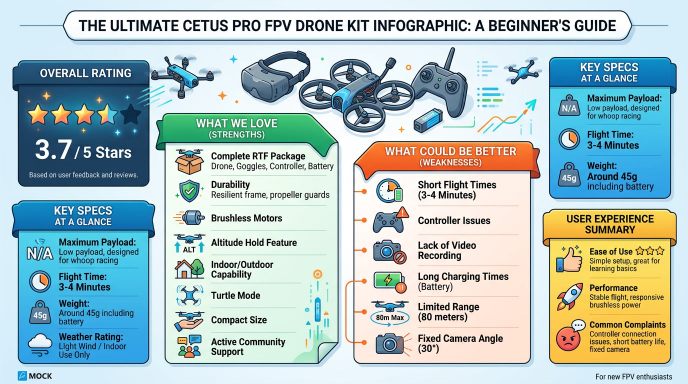
Overall Rating: 3.7/5 Stars ⭐⭐⭐½
PROS:
- Complete RTF (Ready-To-Fly) package—literally everything included
- Extremely durable design survives dozens of crashes
- Brushless motors provide better performance than cheaper alternatives
- Altitude hold feature helps beginners focus on controls
- Can fly both indoors and outdoors in moderate wind
- Turtle mode for easy flip recovery
- Compact 75mm size perfect for indoor practice
CONS:
- Painfully short 3-4 minute real-world flight time
- LiteRadio 2 SE controller suffers from stick drift issues
- No video recording capability on goggles or camera
- Batteries take 20-30 minutes to charge (each!)
- Limited 80-meter range
- Expensive compared to buying components separately
- Fixed 30° camera angle (not adjustable)
What Makes the BetaFPV Cetus Pro Kit Special?
So what exactly are you getting when you drop $230-299 on the BetaFPV Cetus Pro Kit review? Unlike most drone purchases where you need to buy accessories separately, this kit literally includes everything you need to fly FPV the moment you open the box.
Inside that compact carrying case, you’ll find the Cetus Pro drone itself (a 75mm brushless whoop), the VR02 FPV goggles, the LiteRadio 2 SE radio transmitter, three 450mAh 1S LiPo batteries with BT2.0 connectors, a USB charger, spare propellers, and even a screwdriver. It’s the definition of “ready to fly.”
But what makes this kit different from BetaFPV’s other beginner options? The “Pro” designation means you’re getting brushless motors (1102-18000KV) instead of the brushed motors found on the cheaper Cetus Lite. This translates to more power, longer motor lifespan, and better performance in Sport and Manual modes. You’re also getting altitude hold functionality—a feature that’s absolutely crucial for beginners who aren’t ready to manually manage throttle while learning to steer.
The drone measures just 117×117×35mm and weighs a mere 45.8 grams with the battery installed. That tiny footprint means you can practice in your living room without destroying your furniture (well, mostly). The fully enclosed propeller guards aren’t just for protection—they’re essential for the “whoop” flight characteristics that make this drone forgiving when you inevitably crash into walls.
What really sets this apart from traditional camera drones is the FPV flying experience. Instead of watching your drone from the ground like a traditional pilot, you’re seeing exactly what the drone sees through the VR02 goggles. It’s an immersive experience that feels more like piloting a fighter jet than flying a toy. That C02 FPV camera streams a live 5.8GHz video feed directly to your goggles with minimal latency, giving you the real-time feedback essential for FPV flying.
The flight controller is BetaFPV’s Lite 1-2S Pro brushless FC, which supports three flight modes: Normal (N) with altitude hold and limited speed, Sport (S) with faster speeds but still altitude-assisted, and Manual (M) which is full acro mode where you control everything. This progression system lets you gradually build skills without overwhelming yourself on day one.
Is it perfect? Absolutely not. But the BetaFPV Cetus Pro Kit review consensus suggests it offers a relatively painless entry point into a hobby that has a notoriously steep learning curve. You’re paying a premium for convenience and compatibility—everything is designed to work together right out of the box.
Design & Build Quality: Built Like a Tank (In a Good Way)
Score: 7/10
Let’s talk about what matters most for a beginner drone: durability. And here’s where the Cetus Pro absolutely shines. This little whoop is practically indestructible.
The frame uses a combination of plastic and carbon fiber components, with the propeller guards taking the brunt of impacts. Those guards aren’t flimsy decorations—they’re thick, flexible plastic that absorbs crashes without cracking. After dozens (yes, dozens) of full-speed collisions with walls, furniture, and pavement, most users report the guards remain intact with only minor scuffs.
The 75mm wheelbase puts this firmly in the “micro whoop” category, but the build feels substantial in your hands. The canopy pops off easily for battery changes, and there’s even a small storage compartment inside where you can tuck away the antenna. The motors are mounted on reinforced arms, and the propellers themselves are designed to break away cleanly if you hit something hard enough—saving the motors from damage.
One clever design choice: the BT2.0 battery connector. Unlike older JST connectors that require nail-biting precision to unplug, BT2.0 connectors snap in and out effortlessly. After your 20th battery swap of the day (more on that frustration later), you’ll appreciate this thoughtful touch.
The VR02 goggles feel budget-appropriate. They’re not winning any design awards, but they’re lightweight enough for extended sessions and have sufficient padding to block outside light. The LCD screen isn’t OLED quality, but it’s perfectly adequate for learning FPV. The goggles feature two 5.8G 14DBI antennas for signal reception, and they’re compatible with most 5.8GHz FPV cameras on the market.
The LiteRadio 2 SE controller is where the design starts to show its budget constraints. It’s compact and lightweight, which sounds good until you realize it feels somewhat cheap in your hands. The gimbals have a hollow, plasticky feel, and many users report developing stick drift within a few months of use. The controller runs on two AA batteries (not included, annoyingly), and there’s no fancy display—just a simple LED indicator.
Overall build quality is good where it matters most (the drone itself) and merely adequate where it’s less critical (controller and goggles). For a beginner package, that’s probably the right priority.
Camera Performance: Don’t Expect GoPro Quality
Score: 4/10
Here’s where we need to set expectations properly: the C02 FPV camera on the BetaFPV Cetus Pro Kit is not designed for capturing cinematic footage. It’s designed for one purpose only—giving you a live view for flying.
The C02 camera has a fixed 30-degree angle, which is relatively flat for FPV flying. This makes it easier for beginners who aren’t comfortable with the tilted horizon you see on racing drones, but it also limits your forward visibility when flying in Sport or Manual mode. More aggressive pilots will find themselves wanting a steeper camera angle, but you’re stuck with 30 degrees—it’s not adjustable.
Image quality through the goggles is… functional. You’ll get a clear enough view to navigate indoors and outdoors during daylight. The analog 5.8GHz transmission means you’re not getting HD clarity—think of it as watching standard definition TV from the early 2000s. There’s interference, static lines, and occasional breakup when you push the range limits or fly behind obstacles. That’s just the nature of analog FPV systems.
Colors are washed out, especially in mixed lighting conditions. The camera struggles in low light—forget about flying at dusk or in dimly lit rooms. There’s also noticeable latency compared to more expensive digital systems, though the 20-30ms delay is still within acceptable ranges for learning basic FPV skills.
Now for the deal-breaker for many people: the VR02 goggles have no DVR (digital video recording) capability. You cannot record your flights. The C02 camera doesn’t have an SD card slot either. If you want to capture footage, you’ll need to invest in an external recording solution, which defeats the “everything included” promise of this kit.
The lack of recording capability is genuinely baffling in 2024. Even cheap toy drones can record video. Being unable to review your flights or share your progress with others is a significant limitation. You’ll be flying blind (pun intended) when it comes to analyzing your mistakes or celebrating your improvements.
For pure FPV training where you just need real-time visual feedback, the C02 camera gets the job done. But if you had any hopes of capturing your early FPV adventures, prepare for disappointment.
Flight Performance: Surprisingly Capable When Airborne
Score: 7.5/10
Once you’re actually in the air, the BetaFPV Cetus Pro Kit performs admirably for a beginner-focused micro drone. Those brushless motors deliver punchy acceleration and enough power to fly outdoors in winds up to 15mph, which is impressive for a 75mm whoop.
In Normal mode, the drone limits your speed to 1-1.5 m/s and maintains altitude automatically. This is your training wheels mode, and it works beautifully for your first dozen flights. You can focus entirely on learning directional control without worrying about crashing straight into the ground when you panic and let go of the throttle. The altitude hold uses barometric pressure sensing, so it can drift slightly when flying near air conditioning vents or outdoors in variable wind, but it’s generally stable.
Sport mode unlocks speeds of 1.5-3.5 m/s while keeping altitude hold active. This is the sweet spot for most beginners once you’ve got basic controls down. The drone feels responsive and fun without being terrifying. You can zip through rooms, practice figure-eights, and start building the muscle memory that will serve you when you eventually switch to Manual mode.
Manual mode (full acro) is where the training wheels come off. You’re now flying a real FPV drone with full 3D control. The Cetus Pro handles acro mode surprisingly well for a whoop, though the 1102 motors don’t have enough power for aggressive freestyle maneuvers. You can do basic flips and rolls, power loops if you maintain speed, and gentle dives. Don’t expect to be ripping through gaps like a 5-inch racing quad—that’s not what this drone is designed for.
The Lite 1-2S Pro flight controller runs Betaflight firmware, which is the industry standard. This means the flight characteristics feel natural if you’ve been practicing on simulators like Liftoff or Velocidrone. The rates are pre-tuned reasonably well out of the box, though experienced pilots will want to tweak them via Betaflight Configurator.
One genuinely useful feature is turtle mode (flip-over-after-crash). When you inevitably land upside down (and you will, constantly), you can activate turtle mode which temporarily reverses the motor directions to flip the drone back onto its feet. This beats walking over to flip it manually every single time, especially when flying outdoors.
Effective range is about 80 meters in optimal conditions before you start getting significant video breakup. The radio signal (using Frsky D8 protocol) extends a bit further than the video signal, but you’ll want to stay within 50-60 meters to maintain a clear view. For indoor and backyard flying, this is more than adequate.
The main flight performance limitation is the power-to-weight ratio. With a 450mAh 1S battery, you’re not carrying much energy, and those brushless motors drain it fast. The drone flies great—for about 3-4 minutes. Then the low voltage alarm screams at you, and the fun ends abruptly.
Battery Life: The Achilles’ Heel
Score: 3/10
Let’s not sugarcoat this: the battery situation on the BetaFPV Cetus Pro Kit review is frustrating enough to make grown adults consider rage-quitting the hobby.
BetaFPV advertises 4-5 minutes of flight time with the included 450mAh 1S LiPo batteries. In real-world testing, you’re looking at 3-4 minutes of actual flying before the low voltage alarm starts beeping. If you’re flying aggressively in Sport or Manual mode, you might only get 2.5-3 minutes. That’s barely enough time to get comfortable with the controls before you’re landing again.
The kit includes three batteries, which sounds generous until you do the math: 3 batteries × 3.5 minutes average flight time = 10.5 minutes of total flying per session. Then you’re grounded for 60-90 minutes while all three batteries recharge. The included USB charger can only charge one battery at a time, taking 20-30 minutes per battery to fully charge.
This creates a brutal workflow: fly for 3 minutes, land, swap battery, fly for 3 minutes, land, swap battery, fly for 3 minutes, land, then sit around for an hour and a half waiting to fly again. For building muscle memory and practicing consistently, this is absolutely terrible. Your brain loses the feel for the controls during those long charging gaps.
Many users report buying 6-10 additional batteries just to make practice sessions worthwhile, but at $8-12 per battery, that’s another $50-100+ on top of the already expensive kit. You’ll also need a multi-channel charger (another $30-50) to charge multiple batteries simultaneously. Suddenly your $250 beginner kit is pushing $350-400 to be actually functional for serious practice.
The BT2.0 connectors are great for quick swaps, and the batteries themselves are reliable (no puffing or quality issues reported). But the fundamental problem remains: 450mAh just isn’t enough capacity for meaningful flight sessions, and the drone’s design doesn’t accommodate larger batteries.
To be fair, this isn’t unique to the Cetus Pro—most 75mm whoops struggle with flight time due to their tiny size and weight restrictions. But when you’re learning FPV, those extra 30 seconds per flight make a psychological difference between “fun practice session” and “endless frustration.”
If you’re buying this kit, budget for at least 6 additional batteries and a multi-channel charger from day one. It’s not optional—it’s essential.
Controller & App: Budget Hardware Shows Its Limits
Score: 5/10
The LiteRadio 2 SE controller that comes with the BetaFPV Cetus Pro Kit is… well, it exists. It works. But it’s easily the weakest link in this package.
Let’s start with the positives: it’s compact and lightweight, making it easy to toss in a backpack. The hall sensor gimbals provide smooth input without the scratchy feel of potentiometer-based sticks. It runs on two AA batteries (alkaline or rechargeable), which last for many hours of flying. The Frsky D8 protocol provides reliable connection to the Cetus Pro drone with minimal dropout issues.
Now the negatives: the build quality feels decidedly cheap. The plastic housing flexes when you grip it firmly, and the buttons have a mushy, unsatisfying click. The gimbal tension isn’t adjustable, so you’re stuck with the stock feel. There’s no display screen—just a single LED that blinks different patterns to indicate connection status and battery level.
The biggest complaint from long-term users is stick drift. Within 3-6 months of regular use, many LiteRadio 2 SE controllers develop noticeable drift where the sticks don’t return perfectly to center, or where the drone registers input when the sticks are neutral. This is frustrating and potentially dangerous, especially when flying in Manual mode where small inputs matter.
The ergonomics are hit-or-miss. If you have small to medium-sized hands, the controller feels reasonably comfortable. Larger hands will find it cramped, with fingers hanging off the edges awkwardly. The stick length is on the shorter side, which affects precision—you have less travel distance to make fine adjustments compared to full-sized controllers.
Button layout is basic: you’ve got two shoulder switches for arming and switching flight modes, plus two additional switches for auxiliary functions like turtle mode. Everything is accessible, but the switches feel cheap and some users report them becoming loose over time.
There’s no companion app for the LiteRadio 2 SE because it doesn’t have Bluetooth or Wi-Fi connectivity. Any configuration changes require connecting the controller to a computer via USB and using the Betaflight Configurator software. This is standard for hobby-grade FPV equipment, but it’s an extra learning curve for absolute beginners who expected smartphone app simplicity.
The controller doesn’t have ExpressLRS (ELRS) support, which is increasingly becoming the standard for modern FPV systems due to its better range, lower latency, and improved reliability. You’re stuck with the older Frsky D8 protocol, which works fine for the Cetus Pro’s limited range but leaves no upgrade path.
Many experienced pilots recommend skipping the kit entirely and buying a better controller like the RadioMaster Zorro or BetaFPV LiteRadio 3 separately, then purchasing the drone alone. The LiteRadio 2 SE works well enough for your first 20-30 hours of flying, but you’ll likely want to upgrade before that.
Intelligent Flight Features: Keeping It Simple
Score: 6/10
The BetaFPV Cetus Pro Kit doesn’t overload beginners with dozens of autonomous features—it keeps things deliberately simple. This is both good and bad, depending on your expectations.
The primary “intelligent” feature is altitude hold, which uses barometric pressure sensing to maintain stable hover height. This is genuinely helpful when you’re learning, as it lets you focus on directional controls (roll, pitch, yaw) without constantly managing throttle. The altitude hold works reasonably well indoors and in calm outdoor conditions, though it can drift slightly in wind or near HVAC vents that create pressure changes.
The three flight modes (Normal, Sport, Manual) provide a smart progression system. Normal mode limits speed and locks altitude hold, Sport mode increases speed while keeping altitude assistance, and Manual removes all training wheels for full acro control. This gradual transition helps build confidence without throwing beginners into the deep end immediately.
Turtle mode is the other standout “intelligent” feature. After crashes that leave you upside down, you can activate turtle mode via a switch on the controller, which temporarily reverses motor directions to flip the drone right-side up. It doesn’t work 100% of the time (if you’re stuck against a wall or in tall grass, you’re out of luck), but it works often enough to save countless walks of shame to manually flip your drone.
What’s missing? Pretty much every feature you’d find on a DJI or Autel consumer drone: no GPS, no return-to-home, no obstacle avoidance, no automatic takeoff/landing, no follow-me modes, no waypoint navigation. The Cetus Pro is a pure manual-flying FPV drone, and you’re responsible for every aspect of the flight.
There’s no flight data logging or telemetry display in the goggles beyond your basic battery voltage. You won’t see altitude, speed, distance, or any other flight metrics. This keeps the learning experience simple and focused, but data-driven learners might miss having detailed statistics to review after flights.
The lack of GPS is actually intentional—it forces you to develop genuine piloting skills rather than relying on electronic assistance. This is the philosophy of FPV racing and freestyle flying. You’re learning to be a pilot, not a drone button-pusher.
For absolute beginners coming from toy drones, this stripped-down approach can feel like a regression. But for those serious about learning real FPV skills, the simplicity keeps you focused on what matters: stick time and muscle memory.
Safety Features: Basic Protection, No Fancy Systems
Score: 5/10
Safety features on the BetaFPV Cetus Pro Kit are minimal, which is both understandable given its size and somewhat concerning for beginners.
The most obvious safety feature is the propeller guards. These fully enclosed guards prevent the props from directly contacting people, pets, or objects, significantly reducing the risk of cuts or property damage. The guards are flexible enough to absorb impacts without shattering, and they’re the main reason this drone can be flown indoors without significant danger.
At 45.8 grams, the Cetus Pro is light enough that collisions are unlikely to cause serious injury or damage. Compare this to a 250g+ drone, and the reduced kinetic energy makes a real difference in worst-case scenarios. You could fly this into someone at full speed and it would hurt, but it wouldn’t cause lasting damage.
The low voltage alarm is critical for protecting your batteries. When the battery drops below safe voltage levels, the drone beeps loudly and starts flashing LEDs. You have 10-20 seconds to land before the drone automatically cuts power to prevent over-discharging the LiPo battery, which could cause permanent damage or even fire risk. This feature has undoubtedly saved countless batteries from users who lose track of time while flying.
There’s no geofencing, maximum altitude restrictions, or no-fly zone awareness because there’s no GPS. You’re responsible for flying safely and legally. In most countries, drones under 250 grams have relaxed regulations, and at 45.8g, the Cetus Pro qualifies. However, you should still check local laws—some jurisdictions restrict all FPV flying regardless of weight.
The drone has no obstacle avoidance sensors, which would be nearly impossible to implement on something this small anyway. You will crash. Constantly. That’s part of learning FPV. The durability-focused design accepts this reality rather than trying to prevent crashes through electronic intervention.
The Frsky D8 protocol includes failsafe programming. If the controller loses connection to the drone (battery dies, too much interference, out of range), the drone can be programmed to either cut throttle and drop straight down, or maintain current altitude and slowly descend. You set this up in Betaflight Configurator before your first flight.
One notable missing feature: no LED lights bright enough for orientation at distance. The small LEDs on the drone are visible in dim indoor lighting but disappear completely outdoors in daylight. This makes it challenging to maintain visual line of sight, which is legally required in most jurisdictions even when flying FPV.
The lack of advanced safety systems means you need to be the safety system. Fly in open areas away from people, keep spare parts handy, and never push the range limits beyond where you can retrieve the drone if it fails.
Who Should Buy the BetaFPV Cetus Pro Kit?
The BetaFPV Cetus Pro Kit occupies a specific niche in the drone market, and it’s not right for everyone. Let’s break down who benefits most from this package.
Ideal buyers:
You’re brand new to FPV flying and want a complete, compatible package without researching individual components. You’re willing to pay a convenience premium to avoid the overwhelming task of building a custom setup from scratch. You have realistic expectations about performance and understand this is a training tool, not an end-game racing or freestyle rig.
You want something ultra-durable that survives the dozens of crashes inevitable during the learning process. You plan to fly primarily indoors or in small outdoor spaces (backyards, parks) rather than long-range explorations. You’re committed enough to buy additional batteries but don’t want to invest thousands in high-end equipment before proving you enjoy the hobby.
You value the progression system from assisted flying (Normal mode) to full manual control. You’re okay with analog FPV video quality and don’t need cinematic recording capabilities. You have realistic expectations about 3-4 minute flight times.
Wrong choice for:
You’re expecting a plug-and-play experience like DJI drones with GPS return-to-home and automated features. You want to capture high-quality video of your flights to share on social media. You’re impatient with short flight times and frequent battery swapping—these limitations will drive you crazy.
You already own a quality radio controller (RadioMaster, FrSky, etc.) and would rather buy just the drone. You’re ready to spend more for a superior package like the BetaFPV Cetus X with its better camera and controller. You primarily want outdoor flying with 100+ meter range capability.
You’re hoping this will satisfy your FPV racing or freestyle aspirations long-term. The Cetus Pro is a trainer—you’ll outgrow it within a few months and want something more capable. If you’re already confident in your commitment to FPV, consider starting with a 2-3 inch micro quad instead.
The verdict: The BetaFPV Cetus Pro Kit is best for curious beginners who want to dip their toes into FPV flying without fully committing to the hobby financially or emotionally. It’s a relatively low-risk way to discover if FPV flying is something you’re passionate about. If you fall in love with it, you’ll upgrade everything within 6 months. If you don’t, you’ve only spent $250-300 finding out rather than $1000+.
Real-World Performance: What Actually Happens When You Fly
After spending time with the BetaFPV Cetus Pro Kit in various conditions, here’s what daily flying actually looks like beyond the spec sheets.
Indoor flying is where this drone truly shines. The 75mm size lets you navigate through living rooms, hallways, and bedrooms without overwhelming the space. The propeller guards let you bounce off walls, furniture, and ceilings without damage. You’ll knock over lightweight objects and scare pets, but you won’t break expensive vases or TV screens.
The altitude hold works well in climate-controlled indoor environments. You can practice basic maneuvers—hovering, forward flight, figure-eights, orbits—with solid stability. The video feed through the goggles remains clear and interference-free when flying indoors, giving you the immersive FPV experience without stepping outside.
Outdoor flying reveals the drone’s limitations and capabilities. In calm weather (under 5mph wind), the Cetus Pro handles like an indoors dream. You can practice the same maneuvers in your backyard with more space and less stress about hitting walls. The 80-meter range lets you explore comfortably within typical residential lots.
When wind picks up to 10-15mph, the drone still flies but requires constant stick input corrections. You’ll burn through battery faster fighting the wind, dropping flight time from 3-4 minutes down to 2.5-3 minutes. Beyond 15mph winds, flying becomes more frustrating than fun—the lightweight drone gets pushed around significantly, and maintaining control becomes exhausting.
Line of sight challenges appear immediately outdoors. Those tiny LEDs are invisible beyond 20-30 feet in daylight. If your video feed cuts out due to interference, you’ll have trouble seeing the drone’s orientation to manually pilot it back. Always fly in open areas where you can retrieve the drone if you lose control.
Battery management dominates your real-world experience more than any other factor. A typical practice session goes like this: Fly 3 minutes, land with low voltage alarm screaming. Swap battery while the drone cools for 30 seconds. Fly 3 minutes, land, swap. Fly 3 minutes, land. Now all three batteries are depleted and you’re done for 90 minutes. This rhythm breaks your concentration and prevents building consistent muscle memory. You’ll spend more time waiting than flying unless you invest in extra batteries immediately.
The learning curve is real but manageable with the progression system. Week one: Normal mode, learning basic controls, crashing constantly but laughing about it. Week two: Sport mode, starting to feel confident, still crashing frequently but less catastrophically. Week three to four: Manual mode introduction, humbling crashes return, questioning your abilities. Week five to eight: Manual mode clicks, basic flips and rolls successful, genuine joy and addiction sets in.
Maintenance requirements are minimal. Every 5-10 flights, you’ll need to replace a propeller that’s bent or cracked from impacts. The screws holding the canopy occasionally loosen and need tightening. The motors collect hair and debris if flying indoors, requiring occasional cleaning with compressed air. That’s genuinely it—the drone is impressively low-maintenance.
Community and support through online forums (Reddit’s r/Multicopter, BetaFPV Facebook groups) is active and helpful. Beginners get encouragement, troubleshooting help, and upgrade advice regularly. The BetaFPV Cetus Pro Kit review discussions are common enough that you’ll find answers to most questions within minutes of searching.
The upgrade bug hits most pilots around month two or three. Once you’ve mastered basic Manual mode flying on the Cetus Pro, you’ll start lusting after 2-3 inch quads, better goggles with DVR capability, quality controllers, and long-range systems. The Cetus Pro shows you what’s possible, then makes you crave more power, longer flight times, and better video quality. That’s both a success (it successfully introduces you to FPV) and a failure (nothing in this kit is part of your long-term setup).
Pros & Cons: The Complete Picture
PROS:
✅ Complete RTF package—goggles, controller, drone, batteries, charger all included and compatible
✅ Exceptional durability—survives countless crashes without breaking
✅ Brushless motors—better performance and longevity than brushed alternatives
✅ Smart progression system—three flight modes let you gradually build skills
✅ Altitude hold—critical feature helps beginners focus on directional control
✅ Indoor and outdoor capable—versatile flying in various environments
✅ Turtle mode—convenient flip-over-after-crash recovery
✅ Compact size—75mm wheelbase perfect for indoor practice
✅ BT2.0 battery connectors—easy, secure battery swapping
✅ Active community support—plenty of help available online
CONS:
❌ Extremely short flight times—3-4 minutes real-world, 2.5-3 minutes in wind
❌ Long charging times—20-30 minutes per battery with included charger
❌ Controller quality issues—LiteRadio 2 SE develops stick drift, feels cheap
❌ No video recording—goggles and camera cannot record your flights
❌ Limited range—80 meters before significant video breakup
❌ Fixed camera angle—30° not adjustable for different flying styles
❌ Only three batteries included—inadequate for meaningful practice sessions
❌ Expensive for components—buying separately often cheaper than kit price
❌ Poor low-light performance—camera struggles in dim conditions
❌ No telemetry display—minimal flight data in goggles
❌ Outdated controller protocol—Frsky D8 instead of modern ELRS
❌ No GPS or return-to-home—purely manual flying with no electronic assistance
Comparison with Competitors
The BetaFPV Cetus Pro Kit faces stiff competition from both BetaFPV’s own lineup and other manufacturers. Here’s how it stacks up.
BetaFPV Cetus X Kit ($299-349)
The newer Cetus X is essentially the Cetus Pro 2.0. It features a better C04 FPV camera with adjustable angle (0-40°), upgraded flight controller, ExpressLRS (ELRS) protocol support for better range and reliability, and improved goggles with DVR recording capability. The battery and flight times are similar, but you’re getting meaningfully better components throughout.
Verdict: If you can afford the extra $50-100, the Cetus X is the smarter buy. The camera and DVR alone justify the price difference for most users. The BetaFPV Cetus Pro Kit review comparisons consistently favor the X model unless budget is extremely tight.
BetaFPV Cetus Lite Kit ($169-199)
The budget option uses brushed motors instead of brushless, a simpler flight controller without altitude hold, and the same basic LiteRadio 2 SE controller. Flight times are similar (3-4 minutes), but performance is noticeably weaker, and brushed motors wear out much faster.
Verdict: Save the extra $50-60 and get the Pro. Brushless motors and altitude hold are worth every penny for beginners. The Lite is a false economy that will frustrate more than it saves.
EMAX Tinyhawk III Kit ($189-229)
EMAX’s competitor offers similar 75mm brushless whoop design with decent durability, basic goggles without DVR, and a comparable controller. Flight times are nearly identical (3-4 minutes). The Tinyhawk III has a slight edge in motor power and can handle slightly stronger winds.
Verdict: These are nearly equivalent options. Choose based on whichever is cheaper or available locally. Both serve the beginner market well, and both have similar limitations.
GEPRC TinyGo 4K Kit ($229-279)
The TinyGo includes a 4K camera that actually records video (stored on SD card), giving you cinematic footage of your flights. The goggles are slightly better quality, and battery life is marginally improved (4-5 minutes real-world). However, durability is slightly lower, and the learning curve is steeper.
Verdict: If recording your flights is important, the TinyGo 4K is worth considering despite slightly fragile construction. If pure learning is your goal, stick with the Cetus Pro’s superior durability.
Building Custom ($300-500)
Experienced pilots often recommend buying components separately: a quality controller like the RadioMaster Zorro ($110), decent goggles with DVR like Eachine EV800D ($90), a micro whoop like the Mobula6 ($90), plus batteries and charger ($50-70). This costs more upfront but gives you quality components you’ll use long-term.
Verdict: If you’re certain you want to pursue FPV long-term and are willing to research compatibility and configuration, building custom is the smartest path. If you want simplicity and aren’t sure about commitment, the BetaFPV Cetus Pro Kit’s convenience wins.
The positioning problem: The Cetus Pro sits awkwardly in the middle—more expensive than the Lite but inferior to the X, durable like the Tinyhawk III but without the TinyGo’s recording capability. It’s not the best value, best performance, or cheapest option. It’s simply the most available and marketed beginner package, which explains its popularity despite the compromises.
Common User Complaints: What Frustrates Cetus Pro Owners
Spending time in online forums reveals consistent frustrations from BetaFPV Cetus Pro Kit owners. Here are the most common complaints:
“The battery life is unacceptable for learning.” This is the overwhelming number-one complaint. New pilots report feeling like they barely get into the rhythm of flying before the low voltage alarm forces them to land. The inability to build consistent muscle memory during 3-minute intervals frustrates people enough that many buy 10+ spare batteries immediately or quit the hobby entirely.
“The controller developed stick drift within months.” The LiteRadio 2 SE quality issues appear frequently in complaints. Users report the right stick (throttle/yaw) develops centering problems where the drone drifts even with hands off the sticks. Recalibrating helps temporarily, but the drift returns. Some controllers fail completely within 3-6 months of regular use.
“I can’t record my flights—what’s the point?” Beginners expect to capture their FPV footage like they’ve seen on YouTube. Discovering the goggles have no DVR and the camera has no recording capability feels like a bait-and-switch. Even cheap toy drones can record video, so the lack of this basic feature on a $250+ kit generates genuine anger.
“Charging is too slow—I spend more time waiting than flying.” The single-battery USB charger creates brutal downtime. Users describe the frustration of carving out an hour for FPV practice only to spend 10 minutes flying and 50 minutes waiting for batteries to charge. This is fixable with additional purchases, but shouldn’t require them.
“The range is too limited for outdoor flying.” Pilots quickly discover that 80 meters isn’t far outdoors. You reach the effective video range within seconds of flying across a park or field. The anxiety of watching video static increase as you approach the boundary kills the relaxed exploration feeling they expected from FPV flying.
“Why isn’t the camera angle adjustable?” More aggressive fliers complain that the fixed 30° camera angle is too shallow for Sport and Manual mode flying. Racing and freestyle typically use 25-35° angles, and not being able to experiment with different tilts limits their learning and comfort.
“The goggles are uncomfortable for extended use.” Some users with larger head sizes or glasses report the VR02 goggles press uncomfortably against the nose and forehead after 30+ minutes. The foam padding compresses over time, making this worse. Aftermarket foam replacements help but shouldn’t be necessary.
“I wish I’d just bought better components separately.” This regret appears consistently from users 2-3 months in. They realize the LiteRadio 2 SE needs replacing, the goggles need upgrading for DVR, and only the drone itself remains useful. They calculate that spending $350-400 on quality components initially would have served them better than spending $250 on the kit plus another $200-300 upgrading everything.
Despite these complaints, most users acknowledge the Cetus Pro serves its purpose as a durable trainer. The frustrations stem from the kit overstaying its welcome—it’s perfect for weeks 1-8 of learning, but by month three, everything feels inadequate.
Maintenance & Durability: Built to Last (Mostly)
One area where the BetaFPV Cetus Pro Kit genuinely excels is durability and low maintenance requirements. This is crucial for beginners who will crash dozens of times per practice session.
Propeller replacement is your most frequent maintenance task. The propellers are designed as sacrificial components—they bend, crack, or break to absorb impact energy and protect the motors. Expect to replace 1-2 propellers every 5-10 flights depending on crash severity. Fortunately, spare props are cheap ($5-8 for a set of four) and swapping them takes 30 seconds with the included screwdriver.
The motors themselves are surprisingly robust. Users report hundreds of crashes without motor failures. The 1102 brushless motors are sealed against dust and debris, though you should occasionally blast them with compressed air if flying indoors where they collect hair and lint. Motor bearings typically last 50-100+ hours of flight time before developing any grinding or wobble.
Frame and propeller guards hold up remarkably well. The flexible plastic guards absorb impacts without cracking. Even after severe crashes into concrete or pavement, most guards remain intact with only cosmetic scuffing. The carbon fiber frame components are essentially indestructible for normal use. You’d need to deliberately step on the drone or run it over with a car to break the frame.
The camera mount is a potential weak point. Hard crashes can knock the camera loose or misalign it, requiring manual readjustment. Some users apply a small drop of thread locker to the camera screws to prevent loosening. The C02 camera itself is durable and rarely fails even after brutal impacts.
Electronics reliability is generally good. The flight controller and video transmitter are well-protected inside the frame and rarely suffer crash damage. Battery connectors (BT2.0) hold up well to hundreds of plug/unplug cycles without loosening or breaking. The batteries themselves last 100-200+ charge cycles before capacity degrades noticeably.
The controller and goggles require minimal maintenance. Keep them clean, store them in the included case when not in use, and they’ll last years. The main exception is the controller’s gimbal wear issue mentioned earlier—this is a manufacturing quality problem rather than damage from normal use.
Long-term durability feedback from users with 50+ hours of flight time indicates the drone itself remains airworthy indefinitely with basic maintenance. The weak links are the controller (stick drift develops) and batteries (capacity fades after many cycles). The drone, goggles, and charger typically outlast the user’s interest in this beginner-level equipment.
Replacement parts availability is excellent through BetaFPV’s website and hobby retailers. Propellers, motors, frames, cameras, batteries—everything is readily available and reasonably priced. This is a huge advantage over obscure brands where you’re stranded if something breaks.
One durability tip from experienced users: invest in prop guards for your prop guards. Some pilots add small foam bumpers or corner protectors to further cushion impacts, extending the guards’ lifespan even more. For a $250+ investment, taking small steps to maximize durability makes sense.
Final Verdict: A Solid Starter with Significant Compromises
Overall Rating: 3.7/5 Stars ⭐⭐⭐½
So should you buy the BetaFPV Cetus Pro Kit? The answer depends entirely on your expectations, budget, and commitment level.
What the Cetus Pro does well, it does really well. It’s genuinely durable enough to survive the brutal learning curve of FPV flying. The progression from Normal to Sport to Manual mode is intelligently designed and helps build skills systematically. The complete RTF package eliminates compatibility concerns and decision paralysis for beginners who don’t know a Frsky from an ELRS. You can literally open the box, charge batteries, and be flying FPV within 30 minutes. That convenience has real value.
The flight experience itself is genuinely fun when you’re airborne. That first moment when you put on the goggles and see the world from the drone’s perspective is magical. Zipping through your living room at 3 meters per second, inches from obstacles, feeling like you’re piloting a tiny spaceship—this kit delivers that core FPV experience successfully. For introducing someone to FPV flying, it works.
But those limitations are impossible to ignore. The 3-4 minute flight times aren’t just inconvenient—they fundamentally undermine the learning process by preventing consistent practice. The LiteRadio 2 SE controller feels cheap from day one and degrades into genuine unreliability within months. The complete absence of recording capability is baffling in 2024. You’re paying $230-299 for components that mostly need replacing within 6 months if you stick with the hobby.
The value proposition is questionable. For the $250-300 kit price plus another $100-150 for adequate batteries and a multi-charger, you’re at $350-450 total. At that price point, you could build a custom setup with a RadioMaster Zorro controller ($110) that you’ll use for years, better goggles with DVR ($90-120), and a quality micro whoop ($90-100). Yes, that requires research and configuration knowledge, but the long-term value is superior.
Who should buy it: Complete beginners who want zero hassle, aren’t sure if FPV is for them, and value convenience over long-term value. People who need extreme durability for learning. Buyers who understand this is a stepping stone, not a destination. Those who can accept short flight times and plan to invest in additional batteries immediately.
Who should skip it: Anyone who already knows they’re committed to FPV long-term (spend more upfront for better components). Buyers who expect video recording capability. Pilots coming from other hobbies who already own quality radio controllers. Anyone impatient with constant battery swapping. Buyers considering the kit specifically for outdoor long-range flying.
The BetaFPV Cetus Pro Kit review consensus: It’s a competent trainer that successfully introduces people to FPV flying while frustrating them with limitations that didn’t need to exist at this price point. It’s not the best value, best performance, or best long-term investment—but it is the most accessible and marketed beginner package available. That positioning ensures its popularity despite its compromises.
If you buy it with realistic expectations—understanding you’re paying for convenience and durability, not performance or features—you’ll likely enjoy your first few months of FPV flying before graduating to better equipment. Just don’t expect this kit to satisfy your FPV cravings long-term. It’s a gateway drug, not the final destination.
Final score breakdown:
- Design & Build Quality: 7/10
- Camera Performance: 4/10
- Flight Performance: 7.5/10
- Battery Life: 3/10
- Controller & App: 5/10
- Intelligent Flight Features: 6/10
- Safety Features: 5/10
Converting to 5-star scale: (7+4+7.5+3+5+6+5) ÷ 7 = 5.36 ÷ 10 × 5 = 3.7/5 stars
For beginners curious about FPV, it’s worth the investment as an educational expense. Just prepare to upgrade everything except the drone itself within six months.